canvas实战仪表盘
完整代码
可视化学习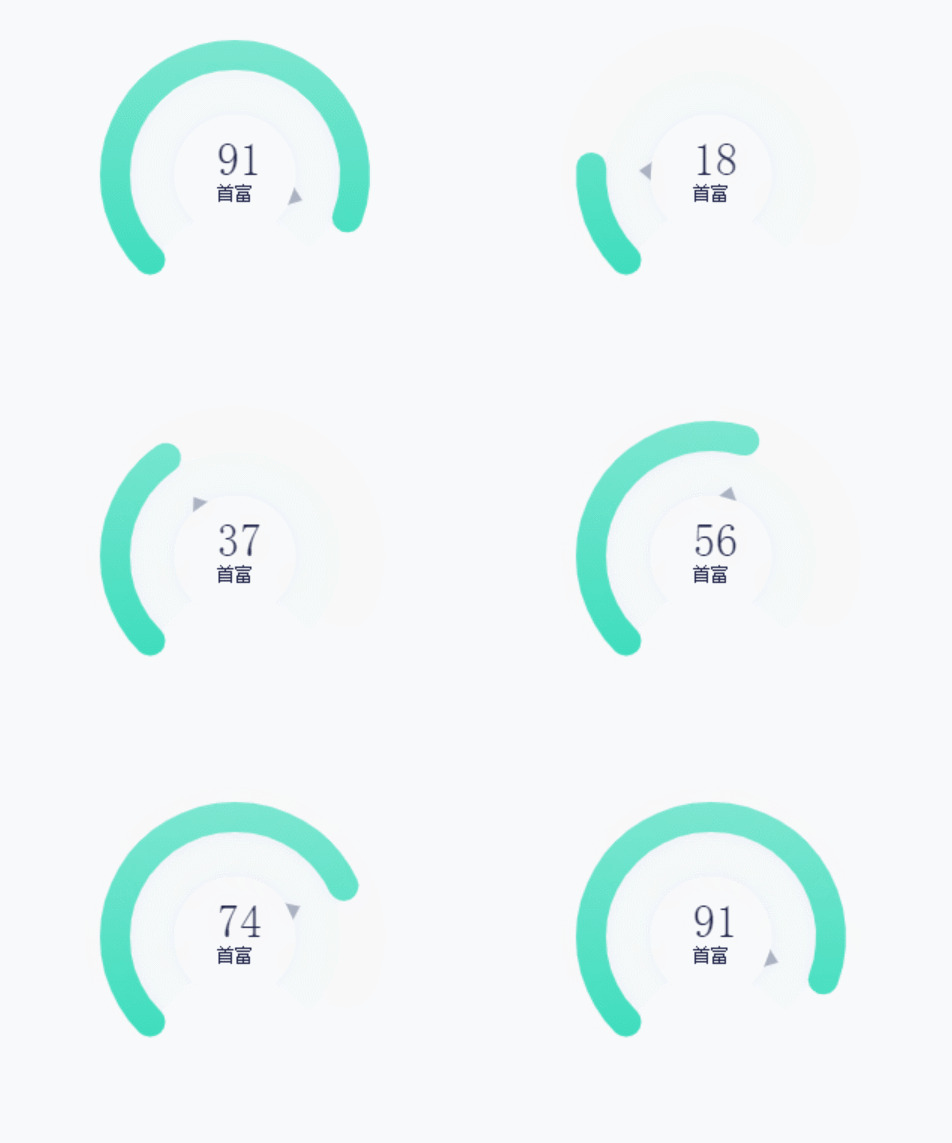
有动画效果1
2
3
4
5
6
7
8
9
10
11
12
13
14
15
16
17
18
19
20
21
22
23
24
25
26
27
28
29
30
31
32
33
34
35
36
37
38
39
40
41
42
43
44
45
46
47
48
49
50
51
52
53
54
55
56
57
58
59
60
61
62
63
64
65
66
67
68
69
70
71
72
73
74
75
76
77
78
79
80
81
82
83
84
85
86
87
88
89
90
91
92
93
94
95
96
97
98
99
100
101
102
103
104
105
106
107
108
109
110
111
112
113
114
115
116
117
118
119
120
121
122
123
124
125
126
127
128
129
130
131
132
133
134
135
136
137
138
139<!DOCTYPE html>
<html lang="en">
<head>
<meta charset="UTF-8">
<meta name="viewport" content="width=device-width, initial-scale=1.0">
<title>Document</title>
</head>
<body>
<canvas id="canvas" height="400" width="400"></canvas>
</body>
<script>
const canvas = document.querySelector('#canvas')
const ctx = canvas.getContext('2d')
let initValue = 0
const value = 91 // 钱多的程度 0-100
const valueText = getValueText(value)
// 修正角度
const updateAngle = 135 / 180 * Math.PI
function getValueText(value) {
if (value <= 0) {
return '太穷了'
} else if (value <= 50) {
return '钱很少'
} else if (value <= 70) {
return '钱不多'
} else if (value <= 90) {
return '一点点'
} else if (value <= 100) {
return '首富'
} else {
return '成仙了'
}
}
function getAngle(value) {
if (value < 0) {
value = 0
}
if (value > 100) {
value = 100
}
const angle = value / 100 * 270 / 180 * Math.PI
return angle
}
const requestAnimationFrame = window.requestAnimationFrame
|| window.webkitRequestAnimationFrame
|| window.mozRequestAnimationFrame
|| function (fn) { setTimeout(fn, 16.7) }
// 初始化位置
ctx.translate(200, 200)
function draw() {
if (initValue < value) {
initValue += 1
}
// 计算旋转角度
const angle = getAngle(initValue)
ctx.clearRect(-canvas.width / 2, -canvas.width / 2, canvas.width, canvas.height)
// 保存初始样式
ctx.save()
ctx.rotate(updateAngle)
// 第二个环
ctx.strokeStyle = '#f5f9fc'
ctx.lineWidth = 40
ctx.lineCap = 'butt'
ctx.beginPath()
ctx.arc(0, 0, 50, 0, 270 / 180 * Math.PI)
ctx.stroke()
// 内环
ctx.fillStyle = '#feffff'
ctx.shadowOffsetX = 0;
ctx.shadowOffsetY = 0;
ctx.shadowBlur = 10;
ctx.shadowColor = "#eceef2";
ctx.beginPath()
ctx.arc(0, 0, 40, 0, Math.PI * 2)
ctx.fill()
ctx.rotate(-updateAngle)
// valueText
ctx.font = '12px serif';
ctx.fillStyle = '#1f2348'
ctx.fillText(valueText, -12, 16)
ctx.save()
ctx.rotate(updateAngle)
// 外环 加动画
const lineargradient = ctx.createLinearGradient(100, 300, 300, 100);
lineargradient.addColorStop(0, '#8fe9d7');
lineargradient.addColorStop(1, '#21d9b4');
ctx.strokeStyle = lineargradient
ctx.lineWidth = 20 // lineWidth一分为二,里外各占一半
ctx.lineCap = 'round'
ctx.beginPath()
ctx.arc(0, 0, 80, 0, angle)
ctx.stroke()
// 三角 加动画
ctx.beginPath()
ctx.rotate(angle)
ctx.translate(40, 0)
ctx.fillStyle = '#abb2c1'
ctx.moveTo(0, -6)
ctx.lineTo(8, 0)
ctx.lineTo(0, 6)
ctx.closePath()
ctx.fill()
ctx.restore()
ctx.fillStyle = '#1f2348'
ctx.font = '30px serif';
ctx.fillText(initValue, -12, 0)
requestAnimationFrame(draw)
}
draw()
</script>
</html>